How Australian small businesses can protect themselves from email and website compromise scams
Table of Contents
As a small business owner, you’re juggling dozens of priorities every day. You’re managing staff, serving customers, paying suppliers, and keeping operations running smoothly. Meanwhile, international criminal organizations are systematically targeting businesses just like yours—not with a quick hit-and-run scam, but with a calculated, long-term strategy to infiltrate your systems, study your operations, and drain your accounts over time.
The terrifying truth? They might already be inside your business right now.
In 2024 alone, Australian businesses lost $152.6 million to business email compromise (BEC) scams—a staggering 66% increase from the previous year – according to the Australian Federal Police (AFP). But these aren’t simple phishing emails. These are sophisticated operations where hackers from overseas gain complete access to your email accounts, payment systems, and customer data through weak passwords and poor security practices. Once inside, they watch, wait, and strike repeatedly—stealing as much money as possible while covering their tracks.
The average cost of a single cybercrime incident for a small business reached $49,000 in 2024. But for businesses where hackers gain persistent access? The losses can be far greater, happening in increments over weeks or months before anyone notices.
How International Hackers Take Over Your Business
The attacks targeting Australian businesses aren’t random spam emails. They’re coordinated operations run by international criminal organizations with a systematic approach:
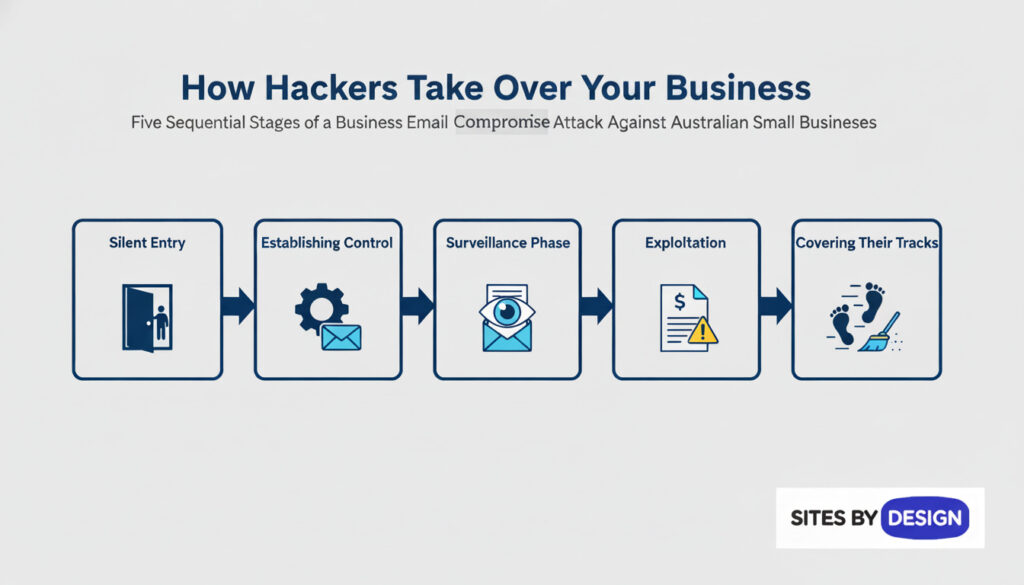
Step 1: The Silent Entry Hackers target business owners and employees with weak passwords or poor security practices. They use:
- Phishing emails that steal your login credentials
- Password guessing attacks (trying common passwords like “Password123” or “CompanyName2024”)
- Exploiting outdated software on your website or computers
- Purchasing stolen credentials from data breaches on the dark web
💡 PLAIN ENGLISH: Think of it like someone making a copy of your office keys without you knowing. They can now come and go as they please, and you have no idea they were ever there. Weak passwords are like leaving your keys under the doormat.
Step 2: Establishing Control Once they have your password, hackers don’t immediately steal money—that would alert you. Instead, they:
- Gain access to your email account and read everything
- Set up forwarding rules so copies of all your emails go to them automatically
- Access your website’s admin panel and hosting account
- Look for access to accounting software, payment systems, and customer databases
- Create hidden administrator accounts so they can get back in even if you change passwords
Step 3: The Surveillance Phase (This is where most businesses are vulnerable) For days, weeks, or even months, hackers quietly monitor your business:
- Reading every email about invoices, payments, and suppliers
- Learning who your customers are and how much they owe
- Understanding your payment approval processes
- Identifying which staff members can authorise payments
- Studying your invoice formats, email signatures, and communication style
- Watching for large upcoming payments or transactions
💡 PLAIN ENGLISH: Imagine someone hiding in your office, watching everything you do, reading all your paperwork, and taking notes on how your business operates. They’re learning exactly how to impersonate you or your suppliers to steal money without raising suspicion.
Step 4: The Exploitation Once hackers fully understand your business, they strike—often multiple times:
- Sending fake invoices that look identical to real ones, just with different bank account numbers
- Impersonating your CEO or manager to request “urgent” transfers to staff
- Intercepting real invoices from suppliers and changing the payment details before you see them
- Using your compromised email to send fake invoices to YOUR customers
- Accessing your website to steal customer payment information
- Creating fake supplier accounts in your systems
The goal isn’t one big theft—it’s many smaller thefts over time, each designed to look legitimate enough that you process the payment without question.
Step 5: Covering Their Tracks Professional cybercriminal groups know how to avoid detection:
- Deleting sent emails from your “Sent Items” folder
- Routing money through multiple international accounts that are hard to trace
- Timing their attacks to coincide with legitimate payments
- Operating from overseas where Australian law enforcement has limited reach
- Using stolen identities and cryptocurrency to hide their real identities
Real Australian Businesses, Real Losses
The Tasmanian Renovation Disaster: A homeowner hired a construction company to renovate her home. Scammers intercepted their email correspondence and sent a near-perfect replica of a legitimate invoice—with one crucial change: the bank account details. She transferred $120,000 to the fraudsters. Due to delays in reporting, the money was never recovered.
The $338,000 Property Settlement: A South Australian conveyancing firm’s client was settling an overseas property purchase. After the firm’s email was compromised, fraudsters sent a fake invoice for $338,000. Fortunately, swift action by the AFP’s Operation Dolos team intercepted and recovered the full amount—but only because the scam was detected early.
The $190,000 Supplier Hack: A Melbourne business regularly paid their supplier for materials. When the supplier’s email was hacked, scammers monitored their communications for weeks before striking. They sent an email appearing to come from the supplier, explaining they’d “updated their banking details.” The business owner, trusting their long-standing relationship, made the payment. $190,000 vanished.
What these cases have in common: hackers had weeks or months of access before anyone noticed.
Signs Your Business May Already Be Compromised
Most businesses discover they’ve been hacked only after money disappears. Here are warning signs that international hackers may already have access to your systems:
Email Warning Signs:
- Emails you don’t remember sending (check your “Sent Items” folder regularly)
- Customers or suppliers mentioning emails you never sent
- Login alerts from unusual locations (especially overseas countries)
- Emails disappearing from your inbox or sent folder
- Password reset requests you didn’t initiate
- Unusual rules appearing in your email settings (especially auto-forwarding rules)
System Access Warning Signs:
- Unknown users or accounts in your systems
- Files or settings changed when no one was working
- Your website admin panel showing logins from strange IP addresses
- Hosting account accessed from countries you don’t operate in
- Failed login attempts in access logs
Financial Warning Signs:
- Suppliers questioning invoices they say they never sent
- Customers claiming they paid invoices you never received
- Small “test” transactions appearing in your accounts
- Banking details changing slightly on invoices
💡 PLAIN ENGLISH: Hackers often do small “test runs” before big thefts. They might change one digit in an invoice amount or try a small fraudulent transaction to see if anyone notices. If it goes through, they know your security is weak and they can steal larger amounts.
The Most Dangerous Sign: Nothing Unusual At All
The most sophisticated attacks show no obvious signs. Hackers are professionals who know how to stay hidden. That’s why preventive security measures are essential—you can’t wait until you notice a problem.
Why Construction, Trade, and Service Businesses Are Prime Targets
According to the AFP, certain industries are particularly vulnerable to BEC scams:
- Construction and trades: High-value transactions, frequent invoicing, complex subcontracting chains, and often limited IT resources
- Professional services: Law firms, accountants, and consultants handling client funds
- Property and real estate: Large transaction values and tight settlement deadlines create urgency that scammers exploit
- Any business with regular supplier payments: Manufacturing, retail, hospitality—if you pay invoices, you’re a potential target
Small family-run businesses are especially at risk because they often lack dedicated IT staff and sophisticated cybersecurity systems.
Your Website: A Goldmine for International Criminal Networks
While email compromise gets the headlines, your business website is equally valuable to hackers—and potentially even more dangerous because compromises can go undetected for months or years.
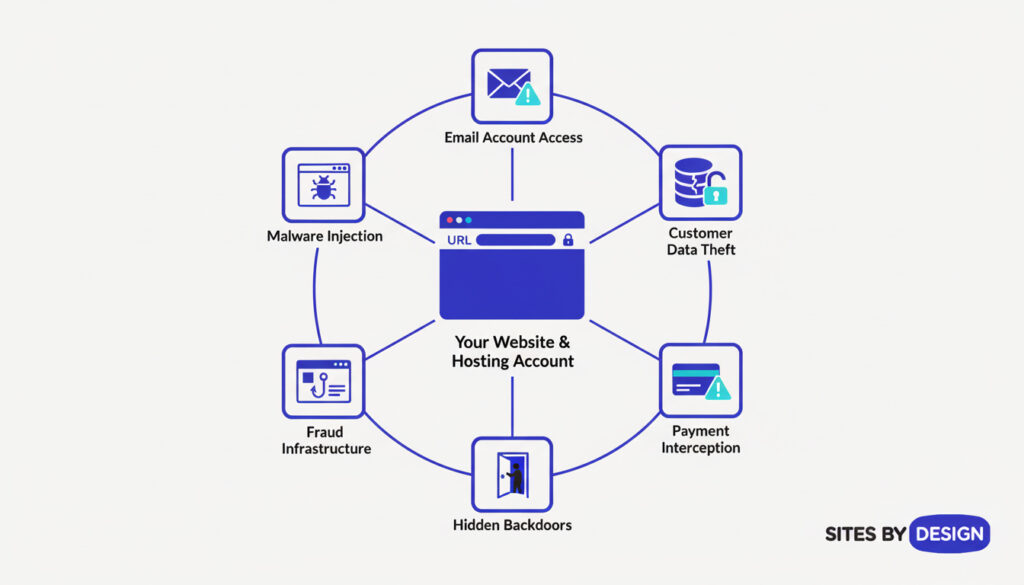
Why Hackers Target Business Websites:
When international criminal organizations compromise your website or hosting account, they gain access to:
💡 PLAIN ENGLISH: Your “hosting account” is like renting office space for your website. It’s where all your website files live, plus your email and the control panel that manages everything. If someone breaks into your hosting account, they control your entire online presence.
- All email accounts associated with your business domain
- Customer databases with names, emails, phone numbers, and potentially payment details
- Your company’s reputation to conduct scams using your trusted brand
- Website admin access to plant hidden code and backdoors
- Payment processing details if you sell online
- Business communications and sensitive documents stored on your server
The Long Game: How Hackers Exploit Compromised Websites
Unlike the smash-and-grab approach, professional hacking groups use compromised websites as long-term infrastructure:
1. Silent Data Collection
- Installing hidden code that captures form submissions (including contact forms and payment details)
- Copying your customer database to sell on the dark web or use in future attacks
- Monitoring admin logins to steal more credentials
- Tracking who your customers are and how they interact with your business
2. Creating Backdoors for Future Access
- Adding hidden administrator accounts that persist even after password changes
- Installing remote access tools disguised as legitimate plugins
- Modifying core files to maintain persistent access
- Setting up alternative entry points they can use if discovered
💡 PLAIN ENGLISH: A “backdoor” is like a secret entrance to your website that only the hacker knows about. Even if you change all your passwords and think you’ve locked them out, they can still get in through the backdoor they created.
3. Using Your Website in Larger Fraud Operations
- Hosting phishing pages: Creating fake login pages for banks or government services on YOUR domain (because your legitimate domain looks trustworthy)
- Email fraud infrastructure: Using your email system to send scam emails that appear to come from your business
- Redirecting customers: Sending visitors to fraudulent payment pages while displaying your branding
- Malware distribution: Infecting your customers’ computers when they visit your site
- Money laundering: Using your business website as part of complex payment fraud schemes
4. Direct Financial Theft
- Intercepting online payments from your customers
- Changing bank account details on invoices sent through your website
- Creating fake versions of your invoices to send to customers
- Accessing your accounting or payment software through your compromised server
The 39% Increase in “Isolated Data Compromises”
The 2024 Australian Signals Directorate Cyber Threat Report revealed a 39% increase in “isolated data compromises”—smaller breaches that don’t cause immediate obvious damage. This is deliberate.
Hackers have learned that massive, destructive attacks get noticed and shut down quickly. Instead, they:
- Steal data slowly in small chunks
- Avoid causing website disruptions that would alert you
- Operate quietly for months, extracting maximum value
- Leave systems functioning normally so you never investigate
Your website could be compromised right now, operating perfectly from your perspective, while criminals harvest customer data and use your infrastructure for fraud.
The Current Threat Landscape in Australia
The numbers paint a concerning picture:
- 87,400 cybercrime reports were lodged in the 2023-24 financial year—that’s one report every six minutes
- $152 million lost to various scams in 2024 by Australian businesses
- 13% of all reported cyber incidents were BEC-related, making it one of the top three cyber threats to Australian businesses
- The construction sector saw targeted attacks increase dramatically, with criminals specifically exploiting this industry’s vulnerabilities
- 40% of BEC phishing emails are now AI-generated, making them more convincing and harder to detect
- Small businesses lodge the majority of cybercrime reports, with many reporting multiple incidents
The Australian Federal Police has established Operation Dolos specifically to combat BEC scams, involving multiple agencies including the Joint Policing Cybercrime Coordination Centre (JPC3), AUSTRAC, the Australian Criminal Intelligence Commission, and international law enforcement partners. The fact that federal authorities have created a dedicated taskforce tells you everything you need to know about the scale of this threat.
The International Criminal Networks Behind the Attacks
These aren’t individual hackers—they’re organized crime syndicates.
The cybercriminals targeting Australian businesses operate from overseas, primarily in:
- Eastern Europe (Russia, Ukraine, Romania)
- West Africa (Nigeria, Ghana)
- Southeast Asia (Vietnam, Philippines, Indonesia)
- China and North Korea
Why Australian Businesses Are Prime Targets:
- Geographic isolation: Australia’s time zone difference means attacks happen while international law enforcement is offline
- High-value transactions: Australian businesses handle significant dollar amounts, making them lucrative targets
- English language business: Communications are in English, making it easier for international criminals to understand and impersonate
- Weaker security culture: Compared to the US and Europe, Australian SMEs have been slower to adopt strong cybersecurity practices
- Limited IT resources: Small family businesses often lack dedicated IT staff to detect intrusions
How Criminal Organizations Operate:
These groups function like businesses with specialized roles:
- Initial Access Brokers: Specialize in compromising accounts and selling access to other criminals
- Intelligence Gatherers: Monitor compromised accounts to understand business operations
- Social Engineers: Craft convincing fraudulent communications
- Money Mules: Help move stolen funds through multiple accounts across countries
- Technical Specialists: Maintain persistent access and cover tracks
💡 PLAIN ENGLISH: Think of it like an assembly line for theft. One group breaks in, another group studies your business, a third group sends the fake invoices, and a fourth group moves the money around so it can’t be traced. Each specializes in their part of the crime.
The Dark Web Marketplace:
On the dark web, criminals buy and sell:
- Stolen Australian business email credentials: $50-$200 each
- Compromised hosting accounts: $100-$500 depending on size
- Australian identity documents: Driver’s licenses $1,500+, passports $1,200+
- Access to Australian business networks: Prices vary based on company size and potential value
- Customer databases: Sold by record count or in bulk packages
Your compromised business credentials are literally for sale on underground marketplaces where criminals shop for targets.
Why They Can Operate With Impunity:
- Operating from countries with limited extradition agreements with Australia
- Using cryptocurrency and complex money laundering networks
- Routing attacks through multiple countries to obscure their location
- Working in jurisdictions where local law enforcement lacks resources or motivation
- Moving stolen funds through multiple international accounts within minutes
This is why prevention is critical—once money leaves Australia, recovery is extremely difficult.
Warning Signs: What to Watch For
Recognising potential scams before they succeed is your first line of defence. Be immediately suspicious if you encounter:
Email-Based Warning Signs:
- Urgent payment requests, especially if they’re unusual or unexpected
- Last-minute changes to bank account details on invoices
- Slight variations in email addresses (john@companyname.com.au vs john@companyname-au.com)
💡 PLAIN ENGLISH: Scammers create “spoofed” (fake) email addresses that look almost identical to real ones. They might add a hyphen, change .com.au to .com, or swap an “l” for an “i”. Always check the FULL email address carefully, not just the display name.
- Requests to keep information confidential or bypass normal approval processes
- Generic greetings instead of personalised ones from people you work with regularly
- Pressure tactics creating artificial urgency (“Pay immediately or lose the discount”)
- Poor grammar or formatting that’s inconsistent with previous communications
- Requests to move conversations from your normal communication channels
Website and Hosting Red Flags:
- Unexplained changes to your website’s appearance or functionality
- Reports from customers about strange pop-ups or redirects
- Unexpected admin logins or changes in your hosting control panel
- Your website loading more slowly than usual
- Emails bouncing back or deliverability issues
- Unknown scripts or files appearing in your website directory
- Warnings from Google or other services that your site may be compromised
Protect Your Business: A Comprehensive Action Plan
The most important thing to understand: the battle is won or lost at the entry point. If hackers never gain access to your systems, they can’t steal from you. If they’re already inside, you need to detect and remove them immediately.
The good news is that most attacks exploit basic security weaknesses that are straightforward to fix. Professional hackers target businesses with weak security because they’re easy. Make your business a hard target, and they’ll move on to easier prey.
Immediate Actions (Do These Today):
0. Check If You’re Already Compromised (Do This First)
Before implementing new security, check if hackers already have access:
- Review your email forwarding rules: Go to your email settings and look for any automatic forwarding to unknown addresses
- Check your sent folder: Look for emails you don’t remember sending
- Review email login activity: Most email providers show recent login locations—look for unusual countries
- Audit website admin users: Check your WordPress/website admin for unknown user accounts
- Review hosting account access logs: Ask your hosting provider or check control panel logs for suspicious logins
- Check for unknown email accounts: Verify all email addresses on your domain are legitimate
💡 PLAIN ENGLISH: Before you lock the doors, check if someone’s already hiding in the building. Many businesses improve their security while hackers already have access through old compromises. Start by finding and removing existing threats.
If you find anything suspicious, contact Sites By Design or a cybersecurity professional immediately before taking action—you don’t want to alert hackers that you’ve discovered them.
1. Establish a Verification Protocol
- Create a mandatory phone verification rule for all payment detail changes
- NEVER accept bank account changes via email alone—always call the known number (not one provided in the email)
- Verify large or unusual payments by calling the recipient directly
- Make this protocol non-negotiable, even for “urgent” requests
2. Implement Two-Person Payment Authorisation
- Require at least two people to approve all significant payments
- Separate the roles of payment initiator and approver
- Document this process and train all relevant staff
3. Secure Your Email Accounts (Most Critical Step)
Email compromise is the primary entry point for hackers. Secure it properly and you block 90% of attacks:
- Enable multi-factor authentication (MFA) on ALL business email accounts immediately
💡 PLAIN ENGLISH: “Multi-factor authentication” (MFA) means you need TWO things to log in – your password PLUS a code sent to your phone. It’s like needing both a key AND a fingerprint to open a door. Even if criminals steal your password, they can’t get in without your phone. THIS IS YOUR #1 DEFENSE AGAINST HACKERS GAINING PERSISTENT ACCESS.
Why MFA is Critical: Even if hackers steal your password through phishing or guessing, they cannot access your account without the second factor (your phone). This single step blocks the vast majority of account compromise attacks.
- Use strong, unique passwords for each account (consider a password manager)
💡 PLAIN ENGLISH: A “password manager” is like a secure digital safe that remembers all your passwords for you. You only need to remember ONE master password, and it creates super-strong passwords for everything else. Popular ones include 1Password, LastPass, or Bitwarden.
- Review and revoke access for former employees or contractors
- Be extremely cautious about accessing email on public Wi-Fi networks
4. Protect Your Website and Hosting
- Change all hosting account passwords to strong, unique combinations
- Enable two-factor authentication on your hosting control panel
- Review who has access to your website admin areas
- Ensure your website platform and plugins are updated regularly
💡 PLAIN ENGLISH: “Plugins” are add-on features for your website (like apps on your phone). If you have a WordPress site, plugins add contact forms, galleries, security features, etc. Outdated plugins are like unlocked windows – criminals use them to break into your website. Keep them updated!
- Keep backup administrator contact details with your hosting provider current
Ongoing Security Measures:
5. Staff Training and Awareness
- Train all employees to recognise phishing emails and suspicious requests
- Conduct regular security awareness sessions—even brief monthly reminders help
- Create a culture where questioning suspicious emails is encouraged, not punished
- Share news of recent scams affecting Australian businesses
6. Technical Protections
- Install and maintain up-to-date antivirus and anti-malware software
- Use email filtering to detect and block phishing attempts
- Implement email authentication protocols (SPF, DKIM, DMARC) for your domain
💡 PLAIN ENGLISH: “Email authentication protocols” (SPF, DKIM, DMARC) are like official stamps on your emails that prove they really came from you. They stop scammers from sending fake emails that look like they’re from your business. Your hosting provider or IT person can set these up.
- Consider endpoint detection and response (EDR) solutions
- Regularly back up your website and ensure backups are stored securely offline
- Use a web application firewall (WAF) for your website
💡 PLAIN ENGLISH: A “web application firewall” (WAF) is like a security guard at the front door of your website. It checks everyone trying to visit and blocks suspicious traffic before it can cause damage. Services like Cloudflare or Sucuri provide this protection.
- Monitor your website for unauthorised changes
7. Financial Safeguards
- Maintain a list of verified contact details for all regular suppliers and customers
- Set up payment limits requiring additional approval above certain thresholds
- Consider payment confirmation services that verify recipient accounts
- Review your bank’s scam protection features and fraud alerts
- Implement positive pay systems if available through your bank
8. Regular Security Audits
- Review your email security settings quarterly
- Check for any unauthorised changes to your supplier database
- Audit who has access to financial systems and payment processes
- Have your website security assessed by professionals annually
- Monitor your website logs for suspicious activity
- Review hosting account access logs regularly
💡 PLAIN ENGLISH: Website “backups” are like photocopies of your entire website stored safely elsewhere. If your site gets hacked or breaks, you can restore it from the backup. Think of it like insurance – you hope you never need it, but you’ll be grateful if you do. Store backups OFFLINE (not on the same server as your website).
Ongoing Monitoring (Detect Hackers Already Inside):
9. Active Surveillance for Compromise
Since hackers try to remain hidden, you need active monitoring:
- Weekly email audit: Check sent folders and forwarding rules every week
- Monthly access log review: Review email and website login history for unusual locations
- Quarterly password changes: Change all critical passwords every 3 months
- User account audits: Monthly review of all users with system access
- Financial reconciliation: Weekly comparison of invoices sent vs. invoices paid
- Customer feedback loops: Regularly ask customers to confirm they received legitimate invoices
💡 PLAIN ENGLISH: Think of this like security camera monitoring. You’re not just locking the doors—you’re checking regularly to see if someone got in anyway. Many businesses discover compromises months after they happen. Regular monitoring catches intrusions early.
10. Implement Anomaly Detection
Train yourself and staff to notice unusual patterns:
- Invoices for slightly different amounts than usual
- Payment requests outside normal business hours
- Communications from familiar contacts that seem slightly “off”
- System slowdowns or unusual network activity
- Unexpected software installations or system changes
- Files or folders appearing that you don’t recognize
Professional Monitoring Services
For businesses at higher risk (handling large transactions, dealing with sensitive data), consider:
- Security Information and Event Management (SIEM) systems
- Dark web monitoring to see if your credentials are being sold
- Professional security operations center (SOC) monitoring
- Automated intrusion detection systems
Build Resilient Processes:
11. Create Clear Protocols
- Document your payment verification procedures in writing
- Establish clear escalation paths for suspicious requests
- Define what constitutes a “red flag” that requires additional verification
- Ensure all staff know these procedures and why they matter
- Create an incident response plan for when something seems wrong
12. Maintain Supplier Relationships
- Keep an updated register of legitimate supplier contact details
- Proactively inform suppliers of your verification procedures
- Request suppliers notify you in advance if their banking details will change
- Establish secure channels for sharing sensitive financial information
- Have regular “check-in” calls with major suppliers to verify recent communications
13. Build Detection Into Your Workflow
The key to catching hackers exploiting your systems is making detection part of normal operations:
- Dual verification: Have two different people involved in any payment over a threshold amount
- Out-of-band confirmation: Always verify changes via phone call (not email) using known numbers
- Financial cross-checking: Weekly comparison of outgoing payments vs. expected invoices
- Customer confirmation: Monthly statements to major customers showing what invoices you’ve sent
- Supplier confirmation: Quarterly check-ins with key suppliers to confirm payment receipt
- Access logging: Require all staff to note when they access sensitive systems
- Change documentation: Require written authorization for any banking detail changes
💡 PLAIN ENGLISH: “Out-of-band” just means using a different communication method. If you get an email about changed bank details, don’t reply by email or call a number in the email—instead, call the phone number you already have saved in your contacts. Hackers control the email, but they can’t fake a phone call to a number they don’t know about.
If You Discover a Compromise: Act Fast
The discovery of a compromise requires immediate, coordinated action. Remember: if hackers have access, they may have been inside for weeks or months, and there may be multiple fraudulent transactions you haven’t discovered yet.
If You Suspect Your Systems Are Compromised:
- Don’t panic, but act immediately – Every hour counts
- Don’t alert the hackers – Don’t send emails or make obvious system changes that would tip them off
- Contact professionals first – Speak with cybersecurity experts before taking action
- Preserve evidence – Don’t delete anything—investigators need logs and forensic data
If You Haven’t Made a Fraudulent Payment Yet:
- Stop all communication via the suspicious email or system
- Contact the supposed sender using known, trusted contact details (not ones provided in suspicious messages)
- Change passwords immediately on ALL accounts (email, website, hosting, banking)
- Enable MFA on everything if not already active
- Report the attempt to ReportCyber (report.cyber.gov.au)
- Save all evidence, including email headers and attachments
- Alert other staff members about the specific threat
- Review ALL recent invoices and payments for other potential fraudulent attempts
If You’ve Already Made a Fraudulent Payment:
IMMEDIATE ACTIONS (First Hour):
- Contact your bank IMMEDIATELY – Call, don’t email. Every minute matters for recovery
- Request emergency payment recall – Banks have procedures to attempt recovery if you act fast
- Contact the recipient bank if you have their details
- File a police report – Call your local police or the AFP
- Report to ReportCyber (report.cyber.gov.au) without delay
COMPREHENSIVE RESPONSE (First 24 Hours):
- Conduct a full system audit:
- Review ALL email sent in the past 3-6 months
- Check for additional fraudulent invoices or payments
- Audit ALL banking transactions for unusual activity
- Review website access logs for unauthorized logins
- Check hosting account for compromises
- Secure all systems:
- Change EVERY password (email, website, hosting, banking, accounting software)
- Enable MFA on every account
- Remove any unauthorized users or email accounts
- Delete any suspicious email forwarding rules
- Check for and remove any backdoors on your website
- Notify affected parties:
- Inform the legitimate business whose identity was used
- Alert your customers if their data may be compromised
- Notify suppliers about the potential for fraudulent communications from your account
- Contact your insurance provider if you have cyber insurance
- Document everything:
- Save all emails, payment receipts, and communication records
- Screenshot compromised accounts before changing anything
- Export and save access logs
- Document timeline of events
- Keep records of all actions taken
If Your Website or Hosting Has Been Compromised:
CRITICAL FIRST STEPS:
- Take the site offline temporarily if it’s being used to harm others or distribute malware
- Don’t just change passwords – Hackers may have installed backdoors
- Contact your hosting provider’s security team immediately
- Isolate the server – Don’t let it communicate with other systems
COMPREHENSIVE CLEANUP:
- Professional forensic investigation:
- Hire a cybersecurity professional to conduct forensic analysis
- Determine how entry was gained
- Identify what data was accessed or stolen
- Find and remove all backdoors and malicious code
- Check for cryptocurrency miners or hidden scripts
- Complete system restoration:
- Restore from a clean backup (if you have one from before the compromise)
- OR rebuild the site from scratch if compromise date is unknown
- Update ALL software, plugins, and themes
- Implement hardened security configurations
- Install security monitoring and intrusion detection
- Mandatory notifications:
- Notify customers if their data was potentially accessed
- Report to the Office of the Australian Information Commissioner (OAIC) if privacy breach occurred
- Inform business partners who may be affected
- Issue public statement if customers were impacted
COMMON MISTAKE: Incomplete Cleanup
Many businesses make the fatal error of just changing passwords and assuming they’ve fixed the problem. This doesn’t work. Professional hackers install multiple backdoors and persistence mechanisms. Unless you:
- Conduct a full forensic investigation
- Remove ALL backdoors and malicious code
- OR completely rebuild from clean backups
…the hackers will simply use their backdoors to regain access within days or weeks.
💡 PLAIN ENGLISH: Imagine finding a burglar in your house. You don’t just ask them to leave and change the locks—you check if they made copies of your keys, installed hidden cameras, or left doors unlocked for later. Hackers are the same. They prepare multiple ways back in, so you need professional help to find and close every entrance.
The Business Case for Cybersecurity
Some business owners see cybersecurity as an optional expense or something that only affects “other businesses.” This thinking is exactly what scammers count on.
Consider this: the average cost of a cybercrime incident for a small Australian business is $49,000. Compare that to the cost of implementing basic security measures—multi-factor authentication is often free, staff training might cost a few hundred dollars, and even professional security services are a fraction of potential losses.
Beyond direct financial loss, consider:
- Reputational damage: Customers lose trust in businesses that fall victim to scams or have compromised websites
- Lost productivity: Recovering from an incident consumes enormous time and resources
- Legal implications: Breached customer data can create legal liability
- Insurance impacts: Some insurers are tightening coverage or increasing premiums for businesses without adequate cybersecurity
- Opportunity cost: Money stolen by scammers could have been invested in growing your business
Your Website: A Responsibility, Not Just an Asset
Your website isn’t just a marketing tool—it’s a responsibility to your customers and the broader business community. A compromised website can:
- Infect visitors with malware
- Steal credentials from anyone who enters login information
- Be used as part of larger attack infrastructure
- Damage trust in online business generally
Regular security maintenance for your website should be as routine as servicing your company vehicles or maintaining your premises. This includes:
- Software updates and patches
- Security scans and monitoring
- Regular backups
- Access control reviews
- Security plugin installation and configuration
At Sites By Design, we can help ensure your website remains secure and doesn’t become an unwitting tool for cybercriminals.
The Evolving Threat: AI and Future Challenges
The threat landscape continues to evolve. By mid-2024, approximately 40% of BEC phishing emails were AI-generated, making them more grammatically correct, contextually appropriate, and difficult to distinguish from legitimate communications.
Criminals are also using AI to:
- Analyse stolen data more efficiently to identify valuable targets
- Create more convincing fake websites and login pages
- Automate attacks at unprecedented scale
- Generate personalised phishing emails based on social media profiles
This means traditional advice like “look for poor grammar” is becoming less reliable. The fundamentals remain important: verify through trusted channels, maintain strong authentication, and foster a culture of healthy scepticism.
You’re Not Alone: Support and Resources
The Australian government and financial sector have recognised the severity of this threat and established several resources to help:
- National Anti-Scam Centre: Coordinates the fight against scams across government and industry
- ReportCyber (report.cyber.gov.au): Report cybercrime and get support
- Scamwatch (scamwatch.gov.au): Learn about current scam tactics and trends
- Australian Signals Directorate: Provides cybersecurity advice and the Essential Eight framework
- Australian Federal Police Operation Dolos: Dedicated taskforce investigating BEC scams
- Your bank: Most major banks now have dedicated fraud prevention teams and can provide guidance
Partner with Experts Who Understand Australian SMEs
At Sites By Design, we understand the unique challenges facing Australian small businesses. We’ve been helping Sydney businesses protect their digital assets for years, and we’ve seen firsthand how devastating these attacks can be—and how preventable they are with the right approach.
We don’t just build websites—we help businesses survive in a hostile digital environment.
Our Comprehensive Security Services:
Compromise Detection & Forensics:
- Immediate security audits to check if you’re already compromised
- Forensic investigation of suspected breaches
- Complete system cleanup and backdoor removal
- Evidence preservation for law enforcement and insurance claims
- Dark web monitoring to see if your credentials are being sold
Preventive Security:
- Implement website security best practices and hardening
- Set up secure, properly configured hosting environments
- Configure and enforce multi-factor authentication
- Deploy monitoring systems for suspicious activity
- Install web application firewalls and intrusion detection
- Implement email authentication protocols (SPF, DKIM, DMARC)
Ongoing Protection:
- Regular security assessments to catch new vulnerabilities
- 24/7 monitoring for intrusion attempts and anomalies
- Automated backup systems with secure offline storage
- Security update management for WordPress, plugins, and themes
- Access log review and anomaly detection
- Incident response planning and support
Training & Support:
- Staff cybersecurity awareness training
- Documentation of security protocols and procedures
- Emergency response coordination
- Direct access to security experts when you need guidance
Why Choose Sites By Design:
- ✅ We understand Australian small businesses – Not generic overseas solutions
- ✅ We’ve seen these attacks firsthand – We know what to look for
- ✅ We focus on practical, affordable protection – Not enterprise-level complexity
- ✅ We’re local and responsive – Sydney-based with genuine support
- ✅ We do the technical work – So you can focus on your business
Your website and online presence are too important to leave vulnerable. Regular security maintenance isn’t just about protecting your business—it’s about protecting your customers, your reputation, and the broader business ecosystem.
Think you might already be compromised? We offer emergency security audits with same-day response for critical situations. The sooner we investigate, the more damage we can prevent and the better chance of recovery.
Take Action Today
International criminal organizations are systematically targeting Australian small businesses with sophisticated, long-term attacks designed to gain persistent access to your systems and extract maximum money over time. These aren’t opportunistic scammers—they’re organized professionals with specialized tools, proven techniques, and nothing to lose.
The harsh reality:
- They may already have access to your business systems
- They’re watching, learning, and planning their strikes
- Once money leaves Australia, recovery is extremely unlikely
- Your weak passwords and lack of MFA are all they need to get in
- They’ll operate for months without you noticing
But you have the power to stop them.
The businesses that fall victim to these attacks aren’t careless or foolish—they’re often experienced, successful operators who simply weren’t aware of:
- How easily hackers gain persistent access through weak passwords
- How long hackers can remain undetected in compromised systems
- How sophisticated the international criminal networks have become
- How critical basic security measures (especially MFA) are
Now you are aware.
Your immediate action items:
- Check if you’re already compromised – Review email forwarding rules, sent folders, and access logs TODAY
- Enable MFA on everything – This single step blocks 90% of attacks
- Implement payment verification protocols – No payment detail changes via email alone, ever
- Audit your systems – Who has access? When did they last log in? From where?
- Train your team – Everyone needs to understand these threats
- Professional security assessment – Have experts check for existing compromises
The cost of action vs. inaction:
- Professional security audit: $1,500-$5,000
- Implementing MFA and strong passwords: Free to $500
- Staff training: $500-$1,500
- Average loss from a single successful attack: $49,000
- Recovery rate for stolen funds: Less than 30%
- Business impact of major breach: Potentially business-ending
The few hours and modest investment you put into security today could save your business tens of thousands of dollars and years of headaches.
Don’t wait until you’re part of the statistics.
The hackers are patient, professional, and persistent. They’re counting on Australian business owners being too busy, too trusting, or too confident that “it won’t happen to me.”
Prove them wrong.
Need Help Securing Your Digital Presence?
Sites By Design specialises in helping Australian small businesses build secure, reliable websites and online infrastructure. We understand the unique challenges facing SMEs and provide practical, affordable security solutions tailored to your needs.
Whether you need a security audit, help implementing protective measures, or want to ensure your website isn’t a vulnerability, we’re here to help.
Contact us today for a confidential discussion about your business’s digital security.